The rule: two discounts combine only if each one's Combinations setting allows the other's class (product, order or shipping). A new discount combines with nothing by default. If they can't combine, Shopify applies the better combination for the shopper.
The three discount classes
Every Shopify discount belongs to a class, and the combination settings work by class:
- Product discounts take money off particular items (Amount off products, Buy X get Y).
- Order discounts take money off the whole cart (Amount off order).
- Shipping discounts reduce or remove shipping (Free shipping).
Which Shopify discounts can combine
| Combination | Possible? | Notes |
|---|---|---|
| Order discount + shipping discount | Yes | Available to all stores |
| Product discount + shipping discount | Yes | Available to all stores |
| Product discounts on different items | Yes | Available to all stores |
| Product discount + order discount | Usually | Not on stores with checkout.liquid customisations |
| Order discount + order discount | Usually | Same condition as above |
| Several product discounts on the same item | Shopify Plus only | |
| Two shipping discounts | No | Only one applies to an order |
Limits per order: up to 5 product or order codes plus 1 shipping code. A store can have up to 25 automatic discounts active at once, including those created by apps.
The messages shoppers see
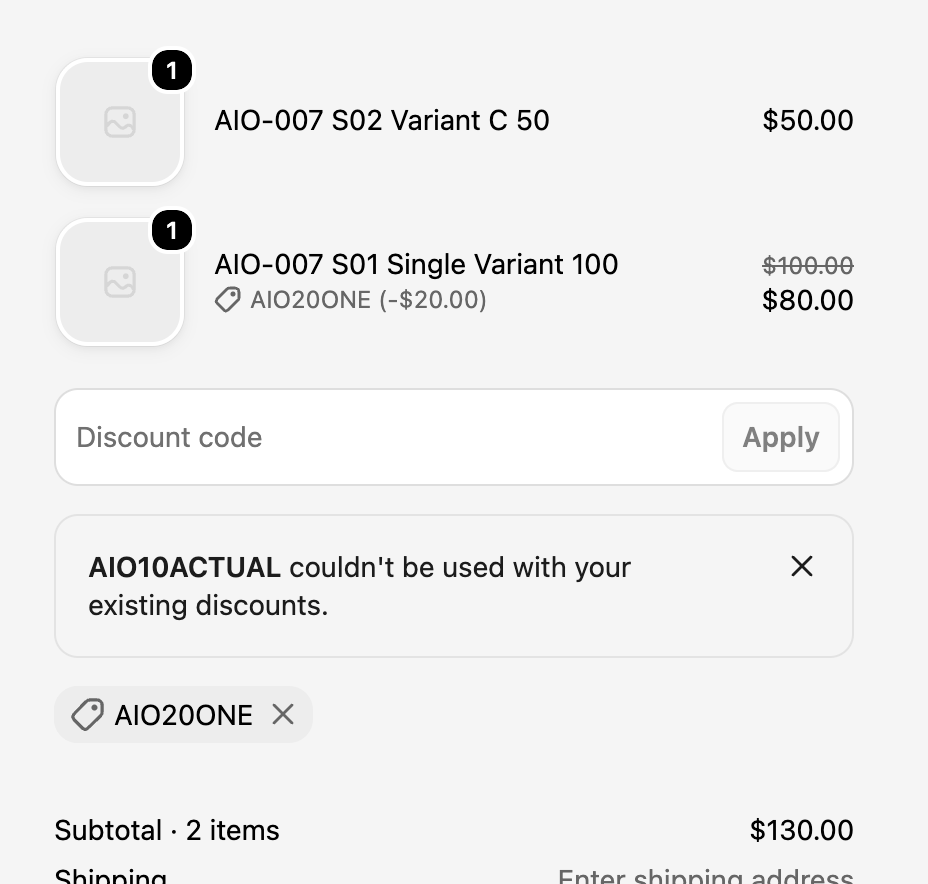
[CODE] couldn't be used with your existing discounts. appears when the code a shopper enters can't combine with a discount already in the cart, often an automatic one.
Some discount codes couldn't be used together. We applied the best combination appears when a shopper enters several codes that can't all apply. Shopify keeps the best-value set.
Automatic discount and discount code at the same time
This is the classic Black Friday trap. You run "15% off everything" automatically, then send an email with a 20% code. If neither discount is set to combine with the other, shoppers using the code get the better of the two, not both, and some will think the code didn't work.
Decide which you want:
- Stack them: open both discounts and, under Combinations, allow the other's class on each.
- Don't stack them: leave combinations off, and word the email so shoppers know the code replaces the sale price rather than adding to it.
How stacked discounts are calculated
Product discounts apply first. Order discounts then apply to the reduced subtotal. Shipping discounts apply last. If you combine more than one percentage order discount, Shopify calculates each on the original subtotal rather than one after the other.
Test the combination, not just the code
New to setting codes up? Start with how to create a discount code in Shopify. For the exact wording of each checkout message, see Shopify discount error messages.
Most combination problems only appear with the right cart. When you test a code before launch, use a cart that the automatic discount also qualifies for, and check the discount lines one by one.
Check what the checkout actually applied
CampaignCart QA runs a guest checkout with your percentage code on desktop and mobile and shows the discount checkout applied against the one you expected. When the numbers disagree, you'll see it before your customers do.
See CampaignCart QA